
Documentation / Set-up guides / Channels
On this page
On this page
This guide is for
Messages to your WeChat service account arrive in Inbox → WeChat, where the team answers them. WeChat allows a reply for 48 hours after a person's message, and up to five messages each time they write. Autopilot does not answer WeChat.
Before you start
- A verified WeChat service account (服务号).
- Its AppID and AppSecret, from WeChat Official Accounts Platform → Settings and Development → Basic configuration. WeChat shows the AppSecret once, when you reset it there.
- The WeChat plugin switched on in Admin → Apps.
Connecting the account
- Open Admin → Messaging → WeChat. Enter AppID and AppSecret, and press Save changes.
- Put the workspace's address on WeChat's whitelist. WeChat takes calls only from addresses on its IP whitelist. Ask the operator for this region's fixed outbound IP address and add it in WeChat under Basic configuration → IP whitelist.
- Press Generate in Server configuration. Paste Server URL, Token and EncodingAESKey into WeChat under Basic configuration → Server configuration, choose Safe mode and press Enable.
- Press Test connection. The answer says whether WeChat accepts the AppID, the AppSecret and the address the desk calls from.
- Regenerate stops the old Token and EncodingAESKey at once: paste the new pair into WeChat straight away.
- After 48 hours, or once the five replies are used, the reply box says so. It opens again when the person writes.
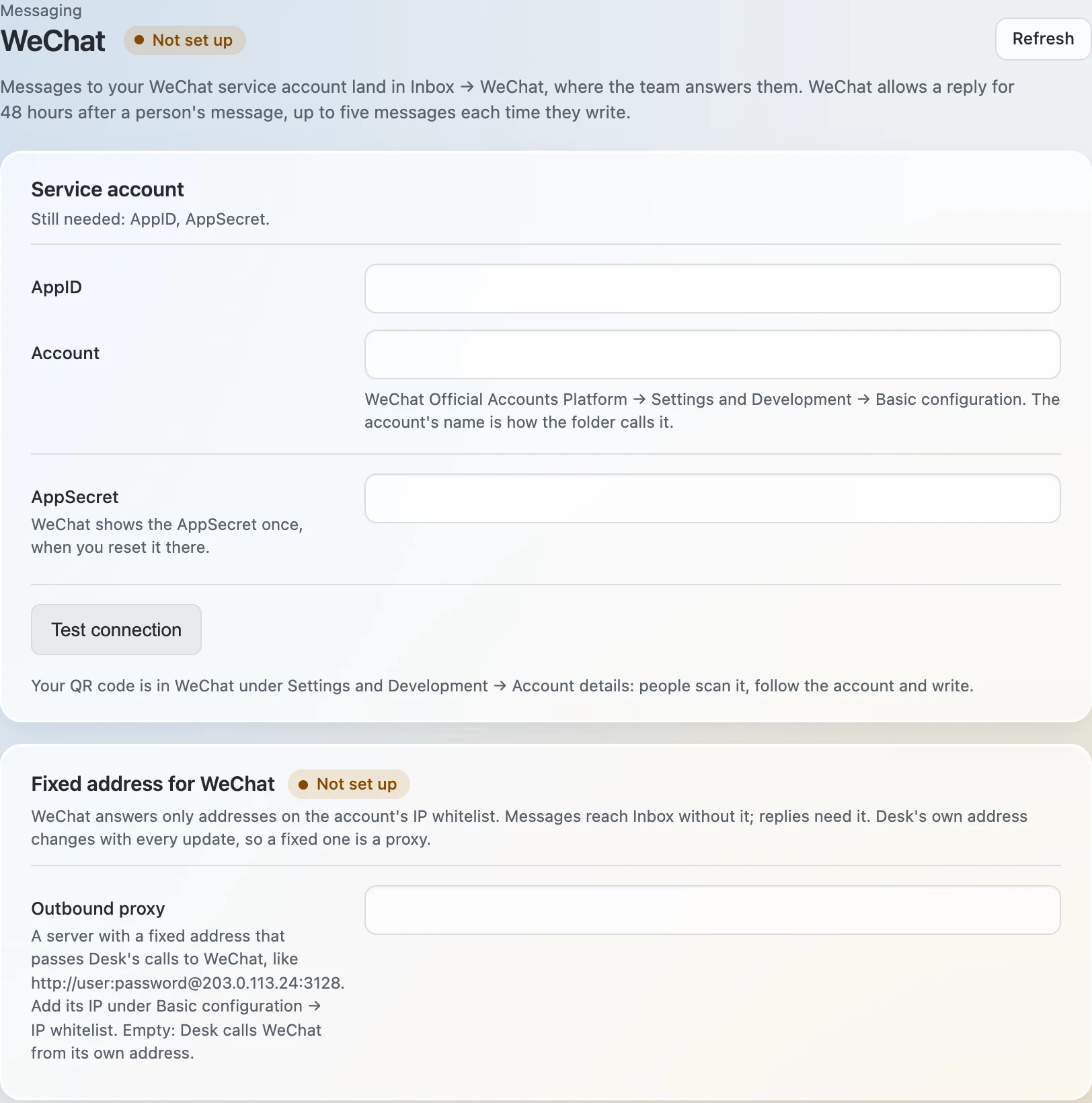
Messages to your WeChat service account arrive in Inbox → WeChat, where the team answers them. WeChat allows a reply for 48 hours after a person's message, and up to five messages each time they write. Autopilot does not answer WeChat.
Before you start
- A verified WeChat service account (服务号).
- Its AppID and AppSecret, from WeChat Official Accounts Platform → Settings and Development → Basic configuration. WeChat shows the AppSecret once, when you reset it there.
- The WeChat plugin switched on in Admin → Apps.
Connecting the account
- Open Admin → Messaging → WeChat. Enter AppID and AppSecret, and press Save changes.
- Give WeChat a fixed address. WeChat takes calls only from addresses on its IP whitelist. In Outbound proxy, enter a server with a fixed address that passes the desk's calls to WeChat, and add its IP in WeChat under Basic configuration → IP whitelist. Without one the desk calls from its own address, which changes with every update of the desk, and replies stop after the next one.
- Press Generate in Server configuration. Paste Server URL, Token and EncodingAESKey into WeChat under Basic configuration → Server configuration, choose Safe mode and press Enable.
- Press Test connection. The answer says whether WeChat accepts the AppID, the AppSecret and the address the desk calls from.
- Regenerate stops the old Token and EncodingAESKey at once: paste the new pair into WeChat straight away.
- After 48 hours, or once the five replies are used, the reply box says so. It opens again when the person writes.