Inbound and outbound
Capture new enquiries on your number and follow up on existing customer conversations.
 DESKTalk to our team
Answer customer enquiries and follow up by phone with AI voice agents connected to your CRM. Calls, transcripts and next actions stay in the same workspace as your sales team.
 Enlarge screen
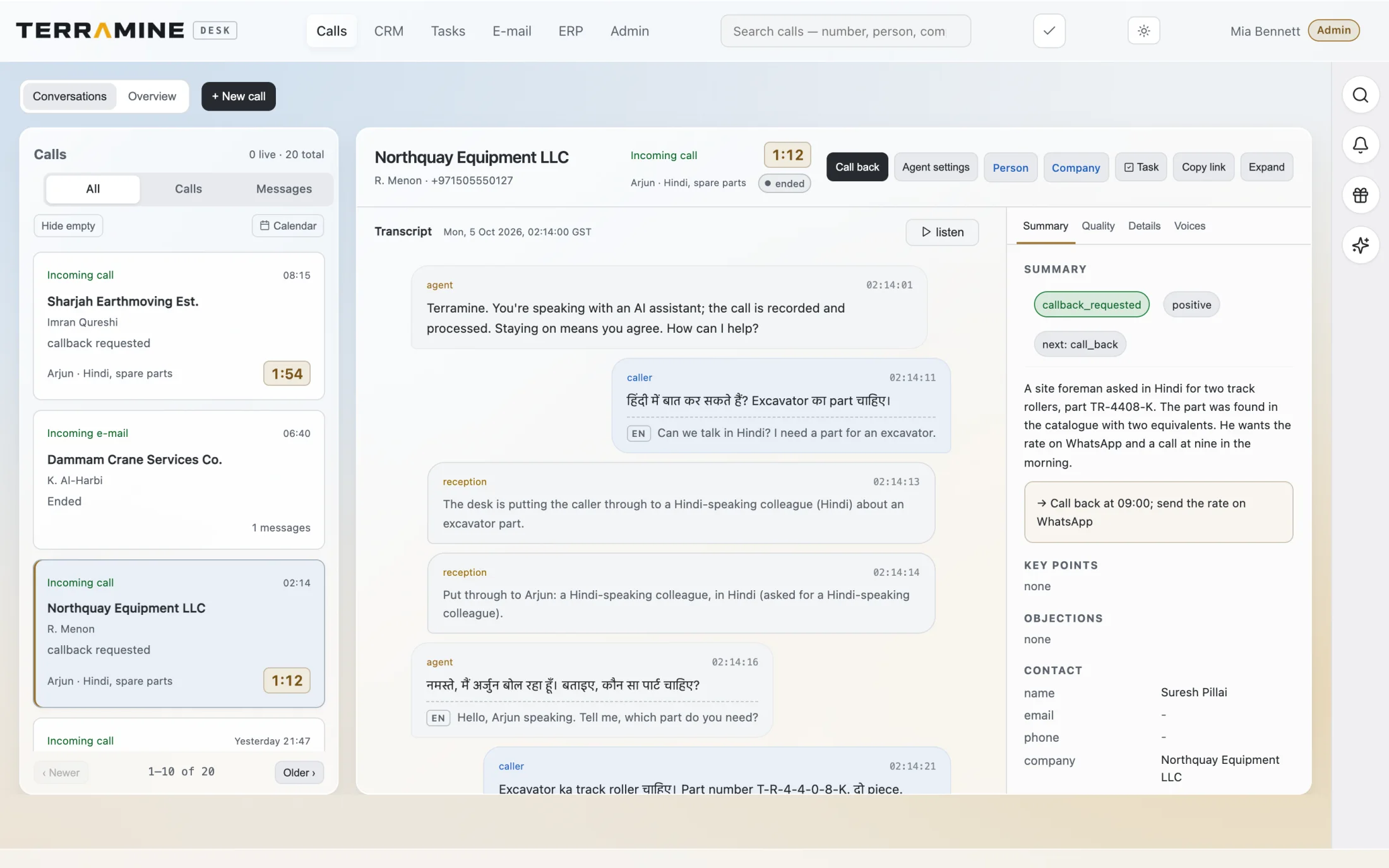
Read the transcript alongside the summary, callback request and links to the customer and task.
 Enlarge screen
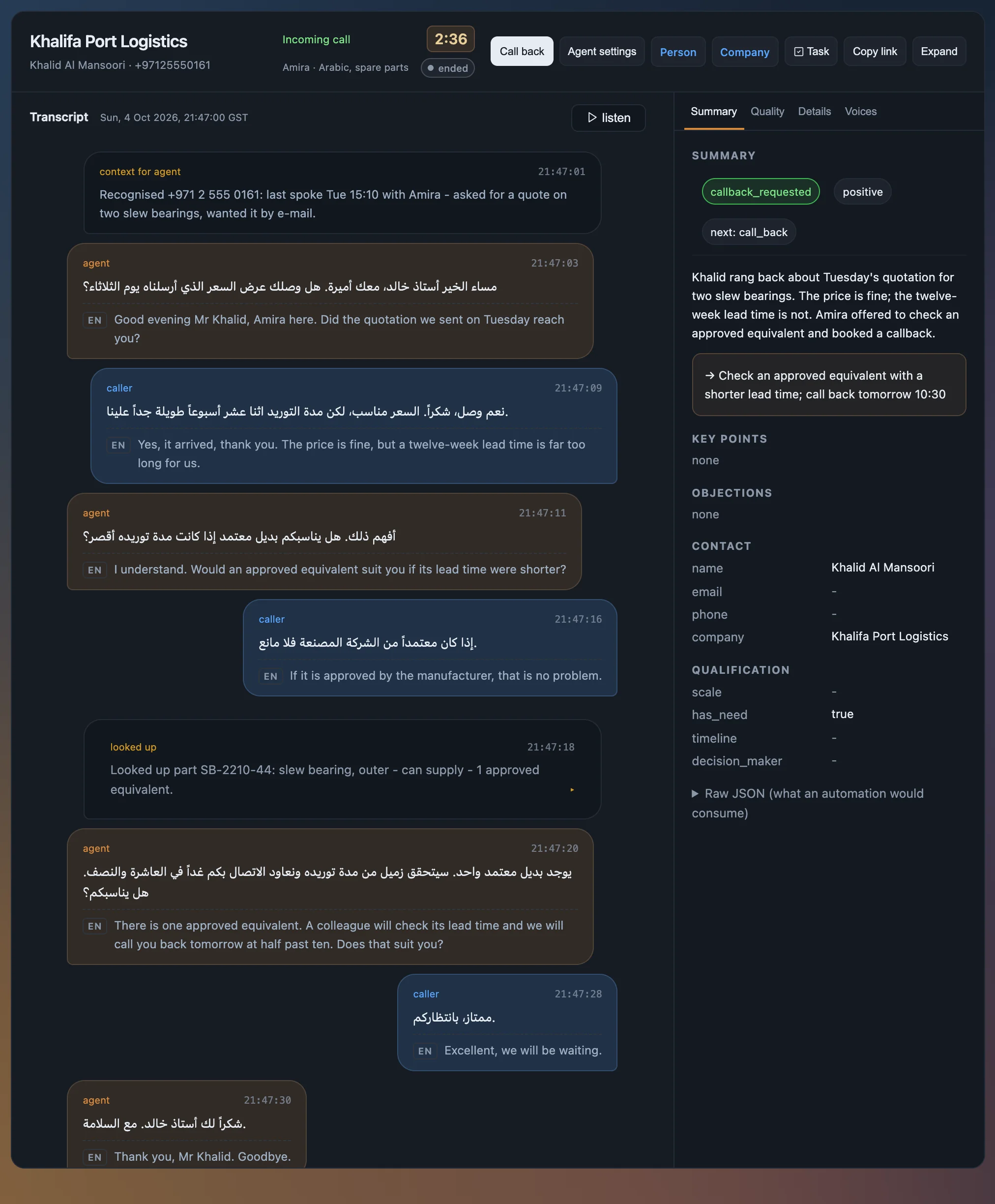
Terramine Desk translates call transcripts from any supported language into English, alongside the original. This example shows an Arabic call with customer context and a clear next action.
Screenshots from the product. The interactive demo is a simplified guided example, not a copy of every product screen. Screenshots show the product version captured at the time.
Use one AI voice agent across several jobs, or create separate personas for reception, sales enquiries and follow-up calls. Give each persona its own role, instructions, supported languages and voices to suit your customers.
Shared prompts for incoming and outgoing calls keep business rules consistent. Each persona adds its own prompts, tone and approach, so you can tailor the conversation to the job without rewriting the common instructions.
Our sales line uses Terramine Desk. The configured agent captures enquiries and can route between AI personas. Try switching languages or spelling out a part number. Your team confirms prices and delivery in writing.
Mention that you are calling from the website so Terramine Desk can record your call as a website enquiry.
Prefer a callback? Leave your number on the contact page and we will call you within one working day.
Call me backAn AI phone agent can answer the first enquiry, ask for missing details and capture what the customer needs. In Terramine Desk, that conversation stays connected to the customer record, email and next task. Your team can review the transcript before making a commercial commitment.
Chat with Terramine Desk to find information, understand what’s happening and get work done across CRM, calls, email, orders and tasks.
Built-in tools connect the AI to your workspace records and actions. Ask in your own words: the assistant can look up information, bring the context together and prepare changes for your approval.
Review proposed plans before confirming. Small edits to the open record can apply immediately; enabled automation follows its configured rules.
Discuss your workflowHear how the Terramine Desk AI voice agent captures a spare-parts enquiry and confirms the requested items and delivery date. Then review the transcript, summary and linked follow-up task to see what your sales team receives.
Listen to the example callCapture new enquiries on your number and follow up on existing customer conversations.
Translate call transcripts from any supported language into English. Read the translation alongside the original, with the summary and next action linked to the customer record.
A returning caller can keep the same agent and the context of the previous conversation.
We configure inbound and outbound voice agents in your choice of supported languages. Languages and voices are selected for your customers and markets during setup, with language switching during a call.
Your team can review the call and handle decisions that require a person.
Read-back and confirmation help the team check references before they become an order.
No. Terramine Desk integrates with telephony providers like Twilio. You bring your own business numbers through your provider account, and we connect them to Terramine Desk during setup.
Choose one versatile persona or several personas for different jobs. Each Terramine Desk agent persona combines shared prompts for incoming and outgoing calls with its own role-specific prompts, supported languages and selected voices. Shared instructions keep business rules consistent, while individual settings define each agent’s role, tone and approach.
The call, transcript and captured enquiry are linked to the customer. Your team can move from the conversation to the CRM record and continue with an email, task or order.
Yes. Open Calls in the demo and choose Incoming example or Outgoing example. Each has its own English audio and transcript.
Yes. The demo includes incoming and outgoing English examples, plus a call that switches from English to Spanish with the full original transcript and English translations visible alongside playback. All examples use synthetic voices. To hear Terramine Desk on our sales line, call +971 4 498 6443; the agent will identify itself as AI and ask what you need.
The demonstrated agent collects requirements and asks the team to confirm price, availability and delivery in writing.
Yes. The demonstration runs with fictional records and never places a real call.
We configure inbound and outbound voice agents in your choice of supported languages. Languages and voices are selected for your customers and markets during setup, with language switching during a call.