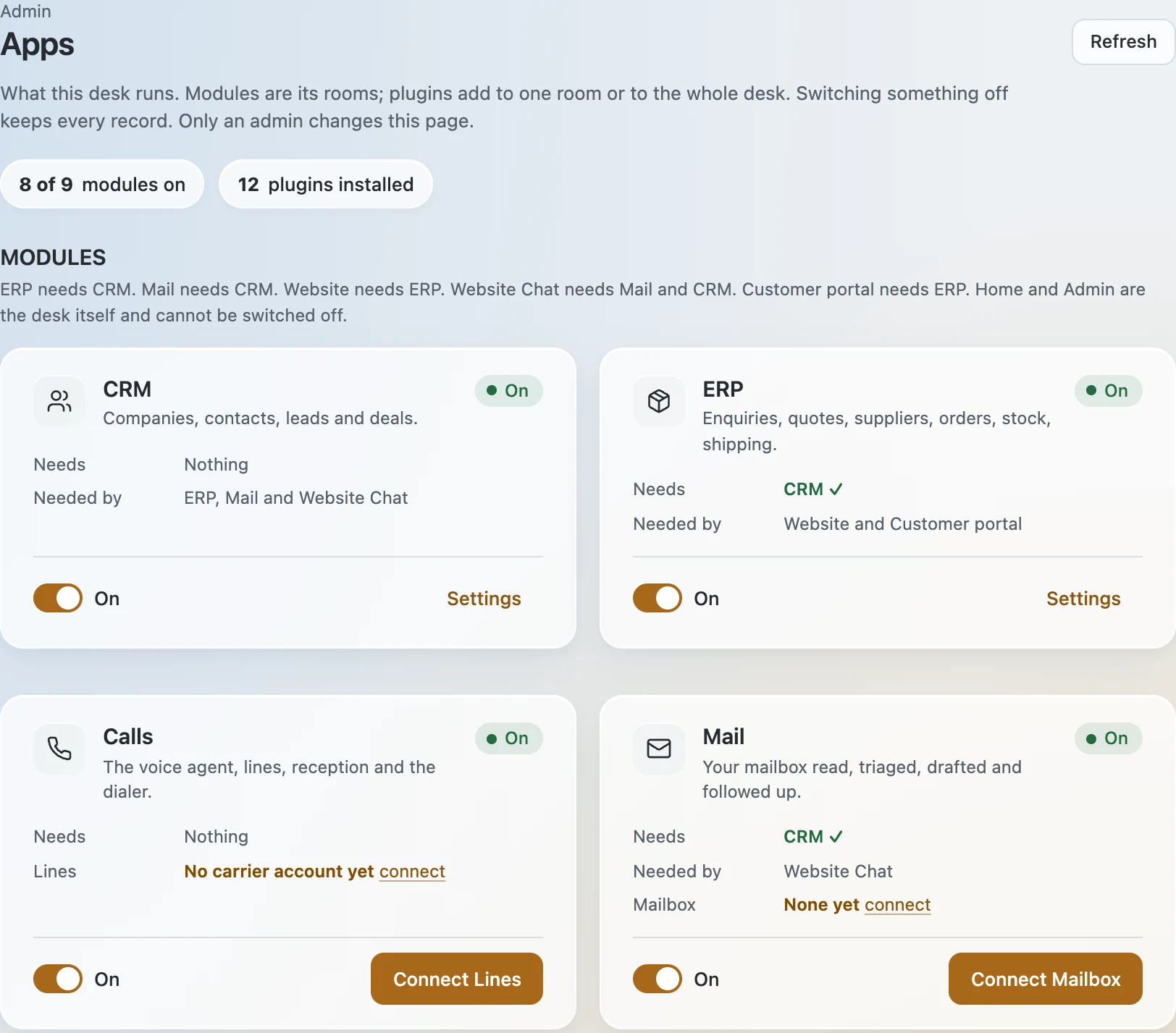
Admin → Apps is the list of what the desk runs. A module is a room: CRM, ERP, Calls. A plugin adds to one room or to the whole desk. Anyone can read the page; only an admin switches.
Turning something on
Open Admin → Apps. Modules are at the top. Plugins are below, each under the module it extends, or under The whole desk.
Press Turn on on a module, or Install on a plugin that has never been used. One that is installed already has a switch.
Answer the sheet, if one opens. When a module needs another that is off, the sheet names it and offers to turn both on. When it needs a connection that is not made yet, the sheet gives a Connect button, and nothing turns on until the connection is made.
Open its settings. The card's Settings button leads to the page where the module or plugin is set up.
Everyone on the desk sees the room appear within a moment, and each switch is written to the audit with your name. Somebody who is not an admin sees Ask an admin to turn it on instead: the admins get the request in the bell, with the person's name.
What the words on a card mean
On the card
What it means
On
Running.
Off
A module that is switched off. Its room is hidden from everybody and its records are kept.
Installed · off
A plugin that was used before and is switched off.
Installed · waiting
Switched on, but a module it needs is off. It starts by itself when that module is turned on.
Not installed
A plugin that has never been turned on.
Trial
Running inside a free trial; the card counts the days left.
Read-only
The trial or the subscription has ended. Reading, searching and exports still work; nothing new is made and nothing is deleted.
Coming soon
Not available yet.
Turning something off
Switching off never deletes anything. The card's Kept line says what stays.
A module that others need takes them off with it. Before you confirm, the sheet lists what goes off, what stays installed and waits, and what keeps working.
The plugins of a module that is off stay installed. They start again by themselves, with their settings, when the module comes back.
Deleting a module's records is a separate action on its own page. It asks twice and is written to the audit.
Plans and trials
A module outside the Free plan asks before it turns on: try it without a card for the number of days the sheet states, once per module, or subscribe at once.
When a trial ends, the module turns read-only until a plan is chosen: its screens and exports stay open and nothing is deleted.
The plan, the price and the invoices are behind Plan and billing on the Apps page.
Your mailbox read, triaged, drafted and followed up.
CRM
Tasks
Tasks, projects, reminders and the board.
—
Drive
Files and folders, and what Terra may know from them.
—
Website
Your own storefront: catalogue, product pages, company pages.
ERP
Website Chat
An enquiry chat on your own websites, in the visitor's language.
CRM, Mail and a connected mailbox
Customer portal
Customers see their orders and quotes.
ERP
The plugins
Plugin
Under
What it adds
Telegram
The whole desk
Notices in your team's chat, and customers' chats in Inbox.
WhatsApp
The whole desk
WhatsApp and Instagram messages.
Facebook Messenger
The whole desk
Messages to your Facebook Page, in Inbox.
WeChat
The whole desk
Messages to your WeChat service account, in Inbox.
Personal agents
The whole desk
Each person's own assistant, private to them.
Push to the phone app
The whole desk
Notices on the phone.
Post-call letter
Calls
What was agreed, in writing.
Operator assist
Calls
Your team makes the call; the AI suggests the lines.
Listen in
Calls
Hear a live call from the dashboard.
CRM connector
Calls
Another CRM in place of this desk's CRM.
Import
CRM
Your client base, from one file.
Listings
CRM
Every unit you sell or rent, known to the agent.
Business templates
CRM
Industry workflows such as clinic coordination and cosmetic tourism, apart from Sales.
Money
ERP
Who owes what, from the bank statement.
Zoho Books
ERP
Invoices and payments kept in step with your accountant. Needs Money.
Freight on the quote
ERP
Shipping priced on the quotation.
Couriers
ERP
DHL, UPS and FedEx on your own accounts.
Estimate
ERP
Made-to-order parts priced in minutes.
Outreach
Mail
One email to the right address, from a list.
Bookings
Tasks
A slot booked on the call.
Admin → Apps is the list of what the desk runs. A module is a room: CRM, ERP, Calls. A plugin adds to one room or to the whole desk. Anyone can read the page; only an admin switches.
Apps: modules and plugins in Admin, as the page looks before anything is entered.
Turning something on
Open Admin → Apps. Modules are at the top. Plugins are below, each under the module it extends, or under The whole desk.
Press Turn on on a module, or Install on a plugin that has never been used. One that is installed already has a switch.
Answer the sheet, if one opens. When a module needs another that is off, the sheet names it and offers to turn both on. When it needs a connection that is not made yet, the sheet gives a Connect button, and nothing turns on until the connection is made.
Open its settings. The card's Settings button leads to the page where the module or plugin is set up.
Everyone on the desk sees the room appear within a moment, and each switch is written to the audit with your name. Somebody who is not an admin sees Ask an admin to turn it on instead: the admins get the request in the bell, with the person's name.
What the words on a card mean
On the card
What it means
On
Running.
Off
A module that is switched off. Its room is hidden from everybody and its records are kept.
Installed · off
A plugin that was used before and is switched off.
Installed · waiting
Switched on, but a module it needs is off. It starts by itself when that module is turned on.
Not installed
A plugin that has never been turned on.
Coming soon
Not available yet.
Turning something off
Switching off never deletes anything. The card's Kept line says what stays.
A module that others need takes them off with it. Before you confirm, the sheet lists what goes off, what stays installed and waits, and what keeps working.
The plugins of a module that is off stay installed. They start again by themselves, with their settings, when the module comes back.
Deleting a module's records is a separate action on its own page. It asks twice and is written to the audit.
Your mailbox read, triaged, drafted and followed up.
CRM
Tasks
Tasks, projects, reminders and the board.
—
Drive
Files and folders, and what Terra may know from them.
—
Website
Your own storefront: catalogue, product pages, company pages.
ERP
Website Chat
An enquiry chat on your own websites, in the visitor's language.
CRM, Mail and a connected mailbox
Customer portal
Customers see their orders and quotes.
ERP
The plugins
Plugin
Under
What it adds
Telegram
The whole desk
Notices in your team's chat, and customers' chats in Inbox.
WhatsApp
The whole desk
WhatsApp and Instagram messages, and the follow-up on WhatsApp.
Facebook Messenger
The whole desk
Messages to your Facebook Page, in Inbox.
WeChat
The whole desk
Messages to your WeChat service account, in Inbox.
Personal agents
The whole desk
Each person's own assistant, private to them.
Push to the phone app
The whole desk
Notices on the phone.
Post-call letter
Calls
What was agreed, in writing.
Operator assist
Calls
Your team makes the call; the AI suggests the lines.
Listen in
Calls
Hear a live call from the dashboard.
CRM connector
Calls
Another CRM in place of this desk's CRM.
Import
CRM
Your client base, from one file.
Listings
CRM
Every unit you sell or rent, known to the agent.
Business templates
CRM
Industry workflows such as clinic coordination and cosmetic tourism, apart from Sales.
Money
ERP
Who owes what, from the bank statement.
Zoho Books
ERP
Invoices and payments kept in step with your accountant. Needs Money.
Freight on the quote
ERP
Shipping priced on the quotation.
Couriers
ERP
DHL, UPS and FedEx on your own accounts.
Estimate
ERP
Made-to-order parts priced in minutes.
Outreach
Mail
One email to the right address, from a list.
Bookings
Tasks
A slot booked on the call.
Cookies for measurement
We'd like to use Google Analytics cookies to count visits and see which pages are read. Nothing is set until you choose, and the site works the same either way. Privacy notice